Company
Customer account
- Signed in as
- Not signed in
- Account status
- Sign in required
- API key
- Sign in to view
- Credits / plan
- Sign in to view
Issue and revoke keys in the API keys tab.

Customer sign-in
Loading your session.
Account
Company
Issue and revoke keys in the API keys tab.
Capability grants
API keys
Treat your API key like a password. Store it only in a secrets manager or private environment variable. Never commit it, paste it into chat, or embed it in client-side code. Skillify shows the raw key once; revoke immediately if it may have leaked.
Agent / integration .env
SKILLIFY_API_BASE_URL=https://console.skillify.so
SKILLIFY_API_KEY=<paste_your_api_key_once>
Call POST /api/decision-overlay with
Authorization: Bearer <SKILLIFY_API_KEY>.
One active key at a time; revoke then re-issue to rotate.
Each accepted call costs 1 credit.
Outputs are draft decision support for qualified / professional investment users —
not investment advice, not a trade instruction, and not for autonomous execution.
Your qualified professional owns final use; do not rely on Skillify outputs as the
sole basis for trading.
Connect your agent
Usage
Sign in to view credit balance and usage.
Credits
Sign in to view credit balance.
You've used your trial credits. Book a quote call to unlock a paid pilot.
Help
Skillify is agent-agnostic. Issue a scoped API key, then call
POST /api/decision-overlay from Claude, Cursor, or any agent that can
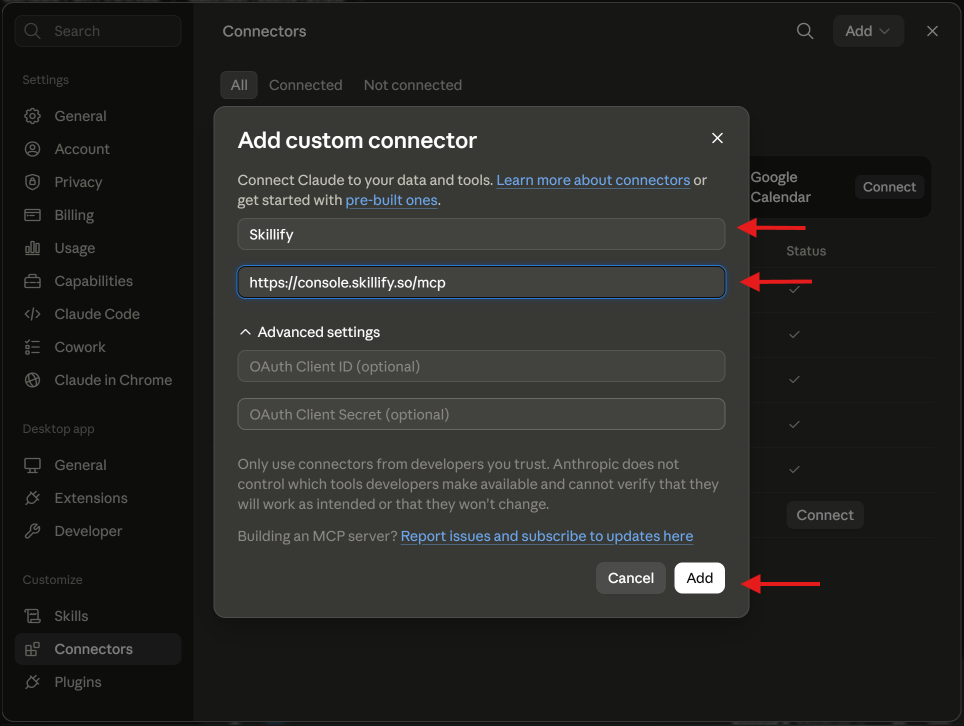
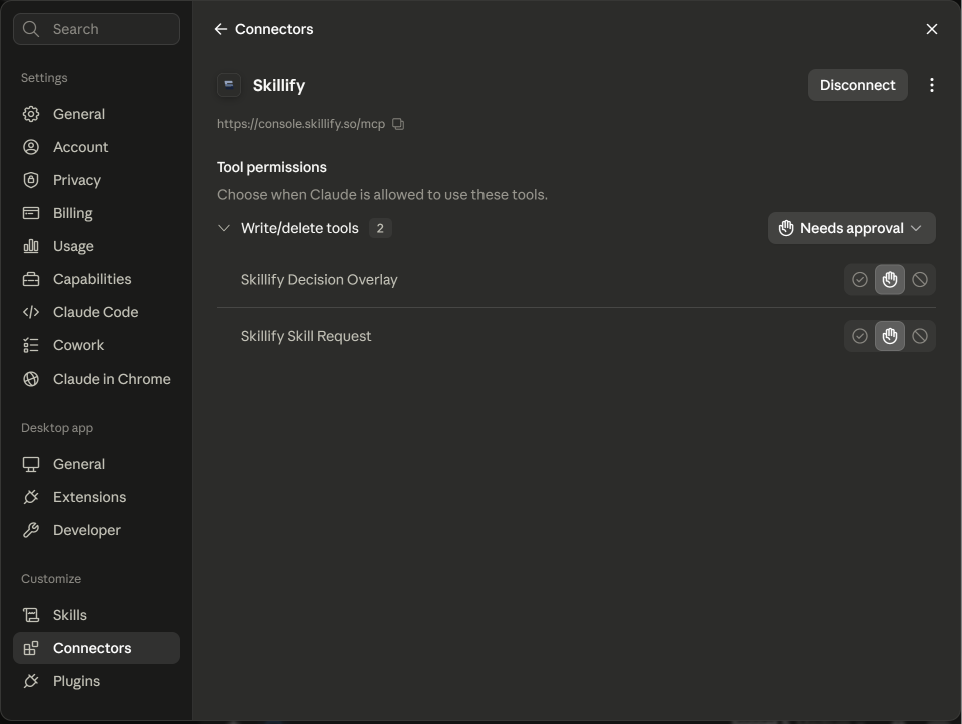
make an authenticated HTTPS request. Claude’s custom connector is the fastest path.
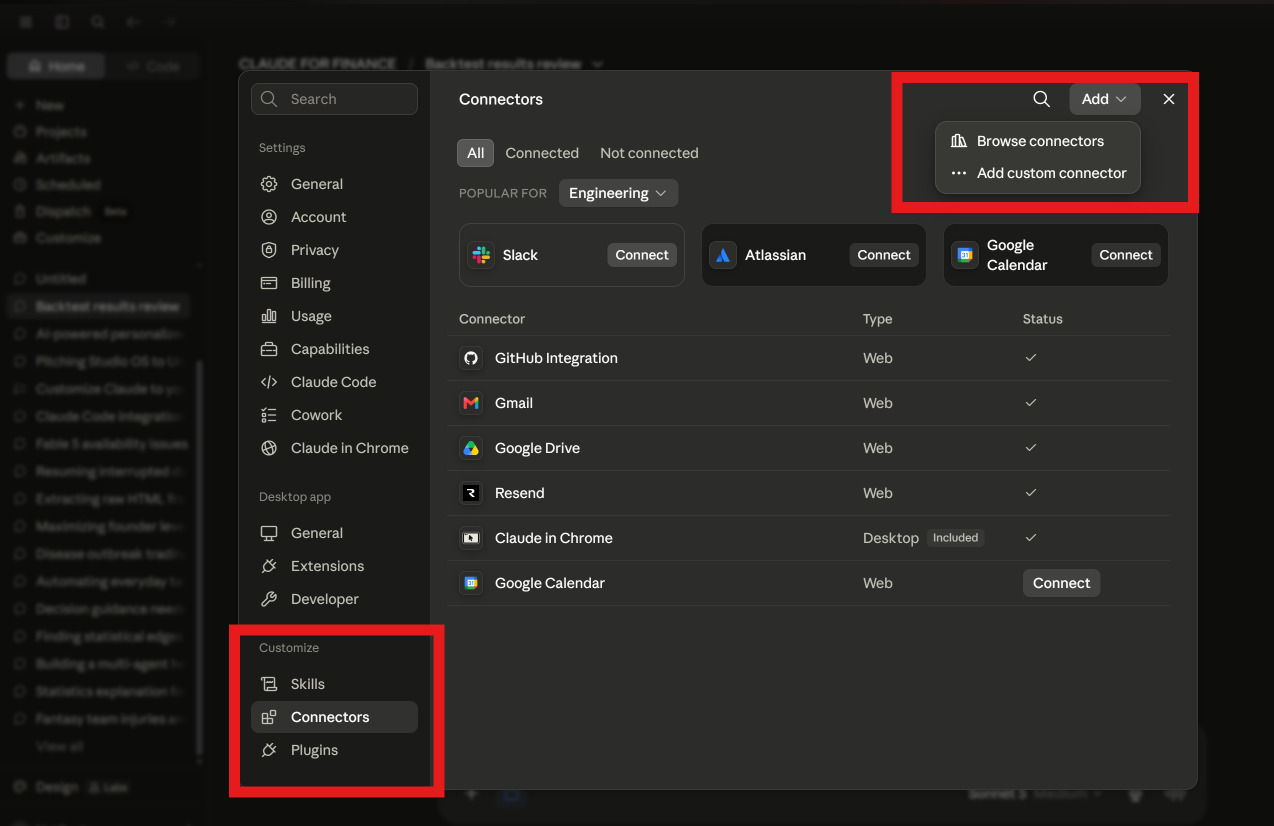
https://console.skillify.so/mcp
→ You can leave OAuth client blank
Desktop with Node only if custom connector is unavailable: Claude Desktop setup.
Use this if you want Cursor, Claude Code, or another agent to call Skillify.
Set up this project to call the Skillify API.

Create a local env file for me, but do not add a real API key yet.

Add these values:

SKILLIFY_API_BASE_URL=https://console.skillify.so
SKILLIFY_API_KEY=paste_your_skillify_api_key_here

Make sure the env file is private and is not committed to Git.

When calling Skillify, use:

POST https://console.skillify.so/api/decision-overlay

Send the API key in this header:

Authorization: Bearer <SKILLIFY_API_KEY>

Send a JSON body like:

{
  "question": "The user's question goes here",
  "context": {},
  "constraints": {},
  "metadata": {}
}

Do not ask the user to choose a Skillify product mode.

Set the tool or shell timeout to at least 30 minutes. Skillify still returns the full book when the pass runs long. Do not abort at 8 minutes.

When the response comes back, show summary.subject, summary.one_line, then overlay.analog_residual (the leftover pair, if present), then overlay.trades. If a trade has expression_legs, show those legs. Present this as draft decision support for a qualified professional — not final investment advice, not a trade instruction, and not for autonomous execution. The customer's qualified professional owns final use.

Never show the raw API key, never call Supabase directly, and never request private Skillify skills, raw heuristics, prompts, or internal IP.
Go to the API keys tab in Skillify and create a new key.
Replace paste_your_skillify_api_key_here with your real Skillify API key.
Timeout note: Skillify answers can take several minutes, up to 30. If your agent looks like it is waiting, do not stop it at 8 minutes.
Skillify hosts Decision Overlay as an MCP tool at
https://console.skillify.so/mcp
(same URL as the Claude connector). Prefer Claude’s custom connector when available.
Developers can also send
Authorization: Bearer <SKILLIFY_API_KEY>
to that URL from MCP-capable clients (for example Claude Code or Cursor).
Skillify does not provide investment advice, trading signals, order execution, or portfolio management. Decision overlays (a draft target paper portfolio with instruments, sizing, and rationale) are draft decision support for qualified / professional investment users — not final advice or a trade instruction, and not for autonomous execution. Your qualified professional owns final use. You remain solely responsible for trading, risk, compliance, and any dissemination or execution decisions, and you agree not to rely on Skillify outputs as the sole basis for any investment action.
Settings
Spend caps and notification thresholds come after the ledger is live.